Play it slowly
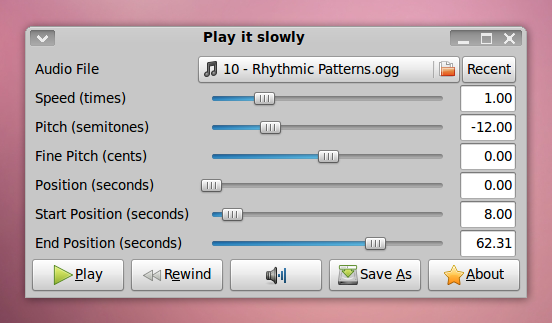
Play it slowly is a software to play back audio files at a different speed or pitch. It does also allow you to loop over a certain part of a file. It's intended to help you learn or transcribe songs. It can also play videos thanks to gstreamer. Play it slowly is intended to be used on a GNU/Linux system like Ubuntu. If you'd like to have a windows version, write a comment.
Features
- Plays every file gstreamer does (mp3, ogg vorbis, midi, even flv!)
- Can use alsa and jack
- Change speed and pitch
- Loop over certain parts
- Export to wav
Screenshot
Download
- playitslowly-1.4.0.tar.gz (40 kb)
- playitslowly-1.3.1.tar.gz (39 kb)
- playitslowly-1.3.0.tar.gz (39 kb)
- playitslowly-1.2.1.tar.gz (37 kb)
Packages
- playitslowly_1.4.0_all.deb (debian/ubuntu)
- Arch Linux PGKBUILD
Development
Feel free to join the development of playitslowly at github.
Jonas Wagner
Hi, I'm very interested in playitslowly, but it don't work on my archlinux.
gst.ElementNotFoundError: pitch
I have python-2.6, pygtk 2.13, and pygst 0.10.13 on my system. Any hint ?
great work !
Comment by Fernando Henrique — 1/4/09 11:56 PM | # - re
Hi Fernando,
Archlinux doesn't have the gstreamer pitch element. You can easily compile that yourself:
pacman -S soundtouch
cd /tmp
wget gstreamer.freedesktop.org/src/gst-plugins-bad/gst-plugins-bad-0.10.9.tar.gz
tar xzf gst-plugins-bad-0.10.9.tar.gz
./configure --prefix=/usr
cd ext/soundtouch
make && make install
test with:
gst-inspect-0.10
I hope that helps!
Comment by Jonas Wagner — 1/5/09 2:59 AM | # - re
Nice, works on my Ubuntu once I installed the GST plugins. Didn't know they can do that. I have some suggestions:
Comment by Sam — 1/5/09 2:14 PM | # - re
Hi Sam,
"try before you install" is possible, just extract the archive and execute ./bin/playitslowly. I already asked the getdeb.net guys to create a .deb package.
Regarding the pitch makes perfect sense, I was just to lazy to do that so far.
Cheers,
Jonas
Comment by Jonas Wagner — 1/5/09 2:37 PM | # - re
Hello, I am trying to run playitslowly on Ubuntu Hardy, and I get no sound and this on the terminal:
-----------------------------------
Traceback (most recent call last):
File "/usr/lib/python2.5/site-packages/playitslowly/playitslowly.py", line 246, in updateposition position, fmt = self.pipeline.playbin.queryposition(TIME_FORMAT, None)
gst.QueryError: query failed
-----------------------------------
Can You help me how to solve this? I guess I have installed everything I need..
Thanks
Tomas
Comment by ElPraga — 1/8/09 11:10 AM | # - re
Hi ElPraga,
That should work in the new version.
Can you try this please?
Comment by Jonas Wagner — 1/8/09 3:49 PM | # - re
Hello Jonas! Thanks a lot!! The version 1.1 is working fine. I have one feature request though. It would be quite useful, if one could invoke playitslowly via "playitslowly file.mp3" (at least I did not find a way how to do it :-) ) It is not a big deal, but it would be nice.
Tomas
Comment by ElPraga — 1/9/09 12:05 AM | # - re
Hi Tomas,
I'll add that feature this evening.
Cheers,
Jonas
Comment by Jonas Wagner — 1/9/09 12:14 PM | # - re
Hallo, this is great programm, I use at home linux, but at work only windows. So version for win suits me well.
Thanks
Comment by chacal — 1/12/09 1:46 PM | # - re
Hi, I can use "playit" by learning languages, but I wasn't successfull with the compilation. I am a current user. I use Mandriva from 2002, so for me could be rpm packages the solution. I Hope, it will be made in time.
Comment by Pavel — 1/15/09 7:50 PM | # - re
it is cool.
Comment by chris — 1/25/09 3:11 AM | # - re
Hi Jonas. First of all great little program. Thanks! I post this just if someone else needs to output on a different soundcard than the default one. You can do it by running:
playitslowly --sink="alsalink device=hw:1"
the part in the brackets was the hard part to find...
Btw, I understand that the start/stop sliders are limited to 0.1sec increments. It would be nice to be able to create perfect loops hence requiring a finer resolution. An idea would be to use keyboard shortcuts to precisely set start and stop positions. What do you think?
Comment by Claudio — 3/23/09 8:56 AM | # - re
Hi Claudio,
it might make sense to add a textbox to the left. Although the the timing of the stop slider is not that accurate anyway (right now). By the way it is playitslowly --sink="alsasink device=hw:1"
Cheers,
Jonas
Comment by Jonas Wagner — 3/24/09 11:54 AM | # - re
Hi Jonas.
Very nice little program, thank you.
I'd like to make two suggestions:
The install script scans for dependencies, so that you find out what you're missing while in install mental mode, not while running it, and:
It would be really helpful if the "position" was in h:m:s, in case I've marked times in an interview, or are switching between different programs.
Cheers.
Comment by Dubito — 5/6/09 10:12 PM | # - re
Hi Dubito,
Thanks for the suggestions. I'll see what I can do.
Jonas
Comment by Jonas Wagner — 5/8/09 12:17 PM | # - re
Hi, Jonas,
Thanks for your Program, I use it quiet often - I play guitar too and I like it especially because the Soundtouch library doesn't change the sound and volume that much when slowing down - compared to the plugin for audacious.
Unfortunately after my last update on my Ubuntu 9.04 your program didn't start anymore complaining it can't load your mygtk library ( on playitslowly.py at line 43).
I helped myself by changing the line from:
from playitslowly import mygt
to
import mygtk
Now it runs perfect again.
Maybe that helps anybody having the same problems as I did.
Cheers,
Christian
Comment by Christian — 5/8/09 6:31 PM | # - re
Thanks for the comment christian. I'll check it out.
Comment by Jonas Wagner — 5/10/09 10:31 PM | # - re
I've spend quite some time looking for a suitable player for transcription of the interviews and was glad to discover playitslowly. I would be happy to start using it right now, however I see at least two essential features missing in the latest version.
1) rewind/forward action. It would be nice to have even two implementations of these with different increments (say 1 and 5 sec).
2) global controls. These can be implemented either through some kind of playitslowly-remote with command line switches (--play-pause, --rw1sec, --fw1sec, --slower --faster), or through dbus interface. However, from my experience the latter is so slow that it will be almost useless for this purpose.
with those features implemented playitslowly would be an ideal tool for my task.
While searching I also found another project, which is supposed to serve the same purpose as yours. It is nicely made, even thought not very stable on my system. I'm sorry to see that it looks like abandoned since 2006, but perhaps you can borrow some ideas from there.
Anyhow, thanks for the good job and would be nice to see this project developing further.
Comment by atenrok — 5/11/09 11:09 PM | # - re
ups. Here is the link to the projects sourceforge.net/projects/opentranscribe
Comment by atenrok — 5/12/09 1:23 AM | # - re
Hi atenrok,
Thank you for the kind words. I'm very busy right now. But I'll consider your proposals as soon as I work on playitslowly again.
Cheers,
Jonas
Comment by Jonas Wagner — 5/12/09 10:02 PM | # - re
Fedora user here, the program installed but wouldn't launch. I followed the advice of #129 Christian above and it works. /usr/lib/python2.6/site-packages/playitslowly/playitslowly.py edited line 43 Also, on Fedora, gstreamer-plugins-bad is divided into two (I needed gstreamer-plugins-bad-extras).
Comment by Patrick — 5/14/09 12:50 AM | # - re
Traceback (most recent call last): File "/usr/lib/python2.6/runpy.py", line 122, in _run_module_as_main "__main__", fname, loader, pkg_name) File "/usr/lib/python2.6/runpy.py", line 34, in _run_code exec code in run_globals File "/home/burned/Desktop/playitslowly-1.1.0/playitslowly/playitslowly.py", line 43, in <module> from playitslowly import mygtk File "playitslowly/playitslowly.py", line 43, in <module>
from playitslowly import mygtk
ImportError: cannot import name mygtk
can someone help me with this problem?
Comment by burned — 5/21/09 2:02 PM | # - re
git snapshot is working (maybe you should update the link in this post) ;)
Comment by burned — 5/21/09 2:07 PM | # - re
Ich hab glesn du sprichst ja deutsch^^ ich hab in letzter zeit nach programmen gesucht bei denen ich die möglichkeit hab den das tempo zu ändern ohne dass sich der pitch ändert.... dein programm hat mir da sehr geholfen...ich hab es jetzt ein wenig abgeändert damit ich nur einen slider hab für pitch und speed...ich werde versuchen da noch irgendwie so eine art medienbibliothek für zu basteln (naja...mal schaun^^...bis jetzt kann ich ja eig noch fast gar kein python) ich finde das programm aber echt klasse! gute arbeit! danke! mfg burned
Comment by burned — 5/22/09 6:56 PM | # - re
This program works well on sound, but not on video. That is, I can watch a video while slowing down the soundtrack, but the video will play at normal speed. I'm running it in Ubuntu Ibex.
Comment by funky_uncle — 5/26/09 10:13 PM | # - re
Can't run playitslowly 1.2.0 on my OSX (Python 2.5.4) or Ubuntu (Python 2.5.2):
I get the following when I 'sudo python setup.py install'...
... byte-compiling /Library/Frameworks/Python.framework/Versions/2.5/lib/python2.5/site-packages/playitslowly/metronome.py to metronome.pyc File "/Library/Frameworks/Python.framework/Versions/2.5/lib/python2.5/site-packages/playitslowly/metronome.py", line 24
class MetronomeSource(gst.BaseSrc):
^
SyntaxError: invalid syntax
Comment by Lyon Lebrun — 5/27/09 3:00 AM | # - re
Awhh, that looks like I broke support for python2.5 by using a class decorator in the metronome, that's not even used right now. I've fixed it in 1.2.1 earlier today :)
Can you please confirm me that it works now?
Thanks,
Jonas
Comment by Jonas Wagner — 5/27/09 8:46 AM | # - re
Hello,
I created a packages for Ubuntu Hardy and Jaunty.
Download from my repository:
Ubuntu Hardy Python 2.5
download.tuxfamily.org/ufs/dists/hardy/main/binary-all/sound/
Ubuntu Jaunty Python 2.6
download.tuxfamily.org/ufs/dists/jaunty/main/binary-all/sound/
This tools is very good :-)
Thanks,
ElGeneralMidi
Comment by elgeneralmidi — 5/27/09 9:13 AM | # - re
Hi,
I heard about this cool tool from my friend. I would like to give it a try but cannot get it to work under gentoo. I'm hopeless. Maybe you could tell where the problem can be. Here is a thread on forums.gentoo.org: forums.gentoo.org/viewtopic-p-5939010.html#5939010
Comment by luboss — 8/21/09 12:29 PM | # - re
Thank you Jonas for the solution. Playitslowly finally works (btw except manual soundtouch compilating I had to download gst-plugins-good and gst-plugins-ffmpeg). The tempo fine-tuner works awesome but I had problems with playback. I cannot even pause or rewind (the button doesn't work at all). I tried gst-inspect-0.10 playback and I can see that it's available (gst-plugins-base).
Comment by luboss — 8/21/09 6:14 PM | # - re
Btw, I would like to ask if it is able to tune the pitch more finer than just whole tones. I mean now only I can is change the pitch from 0 to +1 +2 but cannot do something like +0.25 which would be very helpful. For example in case that guitar tunning is slightly different than the song's one (for example 440 vs. 460). If not I would like to suggest it for the next release.
Comment by luboss — 8/21/09 6:16 PM | # - re
Actually the pitch is currently changed in semitones, not whole tones. I'll think about a solution to your problem when I create the next version.
Cheers,
Jonas
Comment by Jonas Wagner — 8/24/09 8:07 PM | # - re
This is one of the apps I really miss in GNU/Linux after try Transcribe! ( www.seventhstring.com ) But I have an error message that it's annoying me after 2 hours of looking for a solution :(
[code]
playitslowly
sizeof eq: 164
/usr/lib/python2.6/dist-packages/gst-0.10/gst/__init__.py:194: Warning: g_param_spec_internal: assertion `(name[0] >= 'A' && name[0] <= 'Z') || (name[0] >= 'a' && name[0] <= 'z')' failed from _gst import *
ERROR: Caught a segmentation fault while loading plugin file: /usr/lib/gstreamer-0.10/libgstladspa.so
Please either:
Traceback (most recent call last):
File "/usr/lib/python2.6/runpy.py", line 122, in _run_module_as_main "__main__", fname, loader, pkg_name) File "/usr/lib/python2.6/runpy.py", line 34, in _run_code exec code in run_globals File "/var/lib/python-support/python2.6/playitslowly/app.py", line 37, in <module> import gst File "/usr/lib/python2.6/dist-packages/gst-0.10/gst/__init__.py", line 194, in <module> from _gst import *RuntimeError: can't initialize module gst: Error al volver a escanear el registro , child terminated by signal [/code]
Comment by scofield — 9/27/09 2:58 PM | # - re
When i run the app, under Kubuntu 9.04. KDE 4.3, i get this error message: "An error has occured: GError('no element "autoaudiosink"',)" Can anyone tell me what's wrong ?
Comment by Ronen — 9/30/09 7:01 AM | # - re
Hi,
I am VERY GLAD I found this application ! I always liked those raise speed/pitch options (I mean being able to listen to the male version of popular girl singers is hilarious ! haha) + the quality of the sound is a lot better when changing pitch or speed only compared to many software plugins or other softwares similar to this one.
The option of saving the results into a Wav file is AMAZING ! Maybe it's just a little feature, but it makes a whole lot difference =).
THUMBS UP ALL THE WAY ! =)
Comment by Mathias — 10/6/09 5:15 PM | # - re
V interested in trying this out but unfortunately only run windows :(
Comment by Jonathan — 10/19/09 4:30 PM | # - re
Hi!
I really like your program; I just finished an article for the german ubuntuusers-wiki (see wiki.ubuntuusers.de/Baustelle/PlayItSlowly ). Perhaps you could have a look at it and tell me if it's ok for you?
I've noticed one minor "bug": The wave-files produced as output are not properly recognised by kd3 and other cd burning applications - any ideas why?
Otherwise: thumps up! ;-)
so long
hank AKA Heinrich Schwietering
Comment by Heinrich Schwietering — 11/9/09 6:48 PM | # - re
Hello,
is the source code available anywhere?
Comment by Luca — 1/7/10 11:13 AM | # - re
Sure, it's in the download. ;)
Comment by Jonas Wagner — 1/7/10 1:14 PM | # - re
I would most definitely like a windows version
Comment by Jaron — 1/16/10 9:00 PM | # - re
Nice useful program! I've been looking for something like this. For the next update, it would be nice if there were scroll controls on either end of the sliders to bump them just a bit. If there were buttons on to hit to set the start and end positions it might be a bit easier to set up a loop section, If tuning was in cents (1/100 of a semitone) that would match the readout of many tuners- but that's not essential. I'm using it to learn celtic tunes for a slow session I attend- playing 1-key flute or fiddle.
Comment by Coupedefleur — 2/4/10 1:08 AM | # - re
How to Change the Playback Pitch range: Find the app.py file that gets executed when you launch playitslowly. On my Debian system, it's at /usr/share/python-support/playitslowly/playitslowly/app.py. Should be similar on Ubuntu. No idea about Windows, sorry. Edit this file as root. Find this line: self.pitchchooser = mygtk.HScale(gtk.Adjustment(0.0, -24.0, 24.0, 1.0, 1.0, 0.0)). Copy this line and paste just below. Comment the original line by putting a # in front. Now, change the parameters in your new line of code. I wanted a narrower range with more fine control so I went with (0.0, -2.0, 2.0, 0.05, 0.05, 0.0). Experiment. The 2nd and 3rd parameters control the range, the 4th and 5th control the fine adjustment. Save the file and run playitslowly as usual.
Comment by Mike D. — 2/12/10 4:52 PM | # - re
Is it possible to control playitslowly with midi commands ? Like with a midi / OSC pedal ... ?
Comment by jcn — 4/13/10 2:25 AM | # - re
PlayItSlowly doesn't support midi right now. It would be possible to do a hack to translate midi events to x11 key events. I might add this to a future version though.
Comment by Jonas Wagner — 4/13/10 9:38 AM | # - re
Thanks for your answer Jonas. It would be so nice to control playitslowly with a midi pedai ... Maybe you do not need it but here is a little project to translate midi events to X11 events : code.google.com/p/mid2key/
Comment by jcn — 5/8/10 2:39 PM | # - re
Good job, I like it :)
Comment by Arminas — 7/26/10 8:07 AM | # - re
I'd also like to see a windows version. I'm currently using BestPractice (www.xs4all.nl/~mp2004/bp/) which works fine already but still has some room for improvements (e.g. saving loop definitions).
Comment by Matt — 7/26/10 11:25 AM | # - re
Hello, I have not the usage, but know some scientific colleagues use that kind of software. So congrats for this project. I dislike the GUI because its look and feel could be more standardized (but it's the general poor feeling and experience created by the whole set, not this one specifically.
Regards.
Good luck.
Comment by FabriceV — 7/26/10 11:21 PM | # - re
Hi Fabrice,
Thanks for the feedback! "-> add a function to save parameter profiles to reuse them to same or similar recordings.", this is actually already done automatically.
Cheers,
Jonas
Comment by Jonas Wagner — 7/27/10 9:14 AM | # - re
Hi. i start using the software and totally love it, but after actualizing ubuntu it throws me the following error:
an error has occured: RuntimeError("recent_data must reference a 'mime_type' string value",) You should save your work and restart the application. If the error occurs again please report it to the developer.
<type 'exceptions.RuntimeError'>
Python 2.6.5: /usr/bin/python
Sun Nov 21 20:31:10 2010
hope you can help me.
regards.
Comment by mario — 11/22/10 12:33 AM | # - re
Hi. i start using the software and totally love it, but after actualizing ubuntu it throws me the following error:
an error has occured: RuntimeError("recent_data must reference a 'mime_type' string value",) You should save your work and restart the application. If the error occurs again please report it to the developer.
<type 'exceptions.RuntimeError'>
Python 2.6.5: /usr/bin/python
Sun Nov 21 20:31:10 2010
hope you can help me.
regards.
Comment by nehuen — 11/22/10 12:33 AM | # - re
Hi,
Seems very nice. On Ubuntu 10.04, I installed (1.3.0 version) it with install.sh, but when I run it, it returns:
===
/usr/bin/python: No module named playitslowly
===
Thanks a lot for your work.
Seb
Comment by Seb — 11/22/10 11:16 AM | # - re
Just to say, that when I untar it, cd to it, and run it with bin/playitslowly it works. It is just the installation which is problematic for me.
Seb
Comment by Seb — 11/22/10 11:24 AM | # - re
Just to add, that when I untar it, cd to it, and run it with bin/playitslowly it works. It is just the installation which is problematic for me.
Seb
Comment by Seb — 11/22/10 11:24 AM | # - re
Hi,
I think this is a great software. I tried in Ubuntu and it worked perfectly. But I tried to install it in Lucid Puppy and I just can't make it work. It just doesn't open. Any Suggestions?
Thanks,
Guille
Comment by guille — 11/28/10 5:55 AM | # - re
Hi, I really like your software. I installed it in Ubuntu and worked great. But now I am trying to install it in Lucid Puppy but it just doesn't open. I downloaded Python 2.6 for Lucid, Gtk, Gst and compiled -or at least tried to compile- Gstreamer. Maybe I have to compile everything by myself What do you think?
Thanks,
Guillermo
Comment by Guille — 11/28/10 3:31 PM | # - re
Thanks for your soft ! i can work my favorite jazz chorus of django reinhardt on my guitar. merci beaucoup
tristan
Comment by kensify — 12/22/10 12:48 AM | # - re
how do you start playitslowly to have it working with JACK?
Comment by gab — 12/22/10 4:35 AM | # - re
playitslowly --sink=jackaudiosink or configure it systemwide using gstreamer-properties
Comment by Jonas Wagner — 12/22/10 9:20 PM | # - re
nice piece of software, but could you add
the loop system to accept samples too?
I read a comment asking for small increments in loops, by samples I think would be the best solution
Comment by shiki — 12/23/10 8:51 PM | # - re
Hi
The tags for the main cursors don't appear to be translated in french on my Ubuntu. Can I provide the translation for these, to be included in the next version ?
Great piece of software BTW. Very useful.
Comment by agatzebluz — 12/24/10 2:53 PM | # - re
Looks great. Looking forward to trying it out. A couple potential features to consider.
Customizable EQ to filter out bands. Hold feature that plays the current frame in a loop.
Playlist support.
Save presets for songs.
Vocal remover.
I know most of these probably aren't simple additions. Feel free to use/ignore any of them.
Comment by dave — 1/4/11 8:17 PM | # - re
when trying to play an mp3, i get this error: " Message: don't know how to handle audio/mpeg, mpegversion=(int)1, layer=(int)3" and no sound. I have sounds using other applications. I installed playitslowly using the .deb package from this site and the installation seems to run without any errors. I guess a codec is missing, but which ? Thanks
Comment by Ronen — 1/11/11 8:37 AM | # - re
Nice piece of software helped me a lot @ transcribing guitar solos
Comment by Richard — 1/25/11 8:44 PM | # - re
Hey, I love this, just wish there was an alternative for fixed aspect ratio, so that I can make the video I am watching bigger. Right now it drags it in every direction. ^^
Comment by Jetro — 1/26/11 4:47 PM | # - re
I'm getting very choppy playback when I slow a mp3 down below .8. Even when I save it to a .wav file, the .wav file still is choppy. Is there any way to smooth this out?
Comment by Bryan — 2/19/11 2:32 AM | # - re
Sounds like an issue with the gstreamer element that does the slowdown. There are surely better algorithms but it's quite messy in general.
Comment by Jonas Wagner — 2/20/11 9:29 PM | # - re
Hi there, really nice tool! Thanks a lot! Just to help other people, that have the same error .. I installed your debian File (version 1.3.1) and had the following error when launching playitslowly:
GError('no element "autoaudiosink"',)
I needed to manually install the gestreamer-alsa package:
sudo apt-get install gstreamer0.10-alsa
Then I managed to start it via:
playitslowly --sink=alsasink
best regards
Alex
Comment by Alex — 3/4/11 11:41 PM | # - re
... and to play .mp3 files I needed to install these gstreamer plugins:
sudo apt-get install gstreamer0.10-plugins-ugly
Do I have this problems maybe due to using KDE (kubuntu 10.10).
best regards again :)
Alex
Comment by Alex — 3/4/11 11:49 PM | # - re
Thank you very much for this software, I am a musician and it was so much time that I was looking for this for linux!
great!
fabio
Comment by fabio — 3/5/11 12:12 PM | # - re
I'd Like to give it a try. I have windows and think this would be perfect for any fast guitar parts. Thanks in advance, jefe
Comment by jefe — 3/16/11 5:57 AM | # - re
Hi Jonas, Thanks so much for this, it's great - just does what it does very well :-) I'm using it to listen to my uni lectures at a speed which keeps my attention. Been doing so with Rockbox on my MP3 player for a while, tonight went looking for something for the desktop and Playitslowly does the job 100%.
Cheers!
-- Ryan, UK
Comment by Ryan — 3/27/11 3:24 AM | # - re
PLEASSE MAKE A WINDOWS VERSION. IM BEGGINGG YOUUU. PLEASEEEEE. IF THERES A DONATE BUTTON ON YOUR WEBSITE, I'M DEFINITELY DONATING. YOU HAVE TO MAKE A WINDOWS VERSION! PLEASE!!! Windows 7 compatible, please! xxx
Comment by Aabid — 3/27/11 9:38 PM | # - re
This application is awesome. I use it for transcribing interviews. It slows down the talk in the interviews so that I have time to write every word down in Libreoffice.
Comment by Mikko — 4/1/11 10:16 AM | # - re
Thanks!
deb package runs perfect on Ubuntu 10.04.2 LTS
Comment by Thomas — 4/24/11 7:53 PM | # - re
Fantastic little program. I use it a lot to transcribe audio files. As a suggestion it would be great to have the ability to start and stop the audio with hot keys. While typing the text in LibreOffice to press a key combination to start and stop playback in Playitslowly if possible. If that was possible the next great little option would be to have a key press that would rewind the audio back a preset number of seconds, day 1 or 2 seconds.
You have done a fantastic job though and I hope that you continue with the project.
Neil...
Comment by Neil — 5/9/11 10:59 AM | # - re
Hi Neil,
Those hot keys to actually exist already:
https://github.com/jwagner/playitslowly/raw/master/README
Cheers,
Jonas
Comment by Jonas Wagner — 5/9/11 3:12 PM | # - re
Hi Jonas,
As I understood it, Neil was asking for a way to control playitslowly while working in another program, without having to switch focus back to playitslowly. I would love that feature as well, it would really help my workflow.
I use a program called ReMoot to give me universal control of all my other audio playback software on my system. It would be cool if playitslowly can receive play / pause / rewind messages so I could tie it in to ReMoot, or even just make shortcuts on Gnome keyboard manager. The readme shows that it supports some commandline arguments, but I assume that's not a full list? Does playitslowly support receiving any form of messages or any remote access?
Can you shed any light on all this? :)
Comment by Ryan — 5/12/11 8:05 PM | # - re
it currently only supports key events. I'll check if there is a reasonable way to make them global. Implementing DBUS support is probably quite easy too - just didn't have the need for it so far. For me the nicest feature in that direction would be to be able to hook it up to jacks playback handling. Anyway I'll see what I can do.
Cheers,
Jonas
Comment by Jonas Wagner — 5/16/11 9:27 AM | # - re
exactly. I suggested that feature a while ago. Hopefully one of those days Jonas (or somebody else) will find a time to implements it.
Comment by atenrok — 9/5/11 2:29 AM | # - re
Can playitslowly change pitch/speed on a playing CD? or is this an improvement you'd consider making? Really valuable if you could--though the program is terrific already!
Comment by Woody — 5/20/11 11:13 PM | # - re
I keep comparing your program to Roni Music's "Amazing Slow-Downer," a similar technology for the Windoze world. I use it teaching guitar students--it helps when the student wants to play something blisteringly fast to slow it down to 'space-normal' speed. Also helps to adjust the alarming variations in pitch of some recordings, particularly older rock--otherwise we'd have to keep retuning. Your program has ASD beat in that it has the ability to export an 'altered' file. But often the student has the CD in his hand, and ASD can alter a playing audio CD for me too. PLEASE HELP GET ME OUT OF WINDOZE! ;-)
Comment by Woody — 5/31/11 12:23 AM | # - re
It would be awesome if there was a Windows Version.
Comment by Jaime — 5/31/11 11:29 PM | # - re
Yeah, count me in as one user who needs the program to control CDs as well--I haven't installed Play It Slowly yet because it's as deal-breaker without it.
Comment by hamilt03 — 7/13/11 5:05 PM | # - re
Jonas,
Very nice work. This is really catching on big in my guitar class. A lot of people are using OSX. Any change this can be ported over to a Mac?
Comment by Daryl — 7/28/11 2:07 AM | # - re
Thanks man! It was the program that was looking to study music. Great job!
Comment by Emanuel — 8/25/11 5:33 PM | # - re
Hi, I would like to use play it slowly on windows, is it possible ?
Comment by Laurence — 9/2/11 7:58 PM | # - re
1.4.0 source download points to 1.3.1, not to 1.4.0
1.3.1 works great :)
Comment by George — 9/6/11 12:24 AM | # - re
Ouch, fixed that.
Comment by Jonas Wagner — 9/8/11 11:31 AM | # - re
Sweet little application! It ran just fine on Debian Squeeze. The live tempo change that doesn't pitch shift at the same time is exactly what I needed for the musical rehearsals. The singers stay on key and the dancers get to practice a bit slower.
Comment by AudioPro — 10/1/11 3:07 AM | # - re
Just used the tool on umuntu 11.10. Works fine. Really helpfull tool.
One question: If I go with the speed below 0.75 I get artefacts like an echo. Can I get rid of this?
Comment by awolff — 10/16/11 11:54 AM | # - re
Sadly no, it's a side effect of the algorithm used to slow it down.
Comment by Jonas Wagner — 10/18/11 9:44 PM | # - re
Please release a windows version! ASD is too expensive for me, this is perfect but its not for windows.:(
Comment by PPW — 10/17/11 12:08 PM | # - re
Decided not to doo it because of license/patent issues.
Comment by Jonas Wagner — 10/18/11 9:43 PM | # - re
Hi, I'm also interested in the program but am unfortunately using Windows 7. Is there a Windows version yet?
Many thanks!
Julianne
Comment by Julianne — 10/31/11 6:05 AM | # - re
Works fine on Ubuntu 11.10 64-bit
Thanks, very useful, Neil
Comment by Neil — 11/29/11 12:44 AM | # - re
have you done anything with windows yet? I am a bit of a programmer, primarily database, but do have quite a bit of experience with Python in Windows. Don't mind testing if you want to port.
Regards, Ed
Comment by Ed — 12/3/11 6:43 PM | # - re
Hi, and thanks for a brilliant piece of software. I used it frequently with Ubuntu.
A suggestion: When the gstreamer stuff is missing, the program could say something instead of just not working? Got a bit frustrated for a while there. Works now, keep up the good work!
Comment by Jari — 12/4/11 6:41 PM | # - re
Just installed under Ubuntu 10.04 and works perfectly: great software, thanks so much Jonas. Andrea
Comment by Andrea — 12/8/11 6:24 PM | # - re
Nice job ! I use it for a while, and i'm actually coding for midi support with mididings : left to do is saving midi preferences, and support for two simultaneous midi devices (for example keyboard and foot pedal)
Comment by Francois — 12/20/11 6:30 PM | # - re
Hi Jonas,
I was sat in front of my Ubuntu box last night trying to learn the solos to Iron Man and Seasons in the Abyss on my guitar. I decided to do a quick search to see if there was any software whch would make looping the parts easier. I soon found your app and within a few minutes I was up and running. I couldn't believe how easy it was to grab a section, slow it down and loop it until I nailed it!
I love the simplicity and elegance of the application.
Thanks a lot for the effort you put into this. Thanks to you I know another black Sabbath solo. If only you could help me play as fast as Slayer!
Comment by Garry — 2/8/12 4:39 PM | # - re
does it work under lubuntu? it worked great with ubuntu but after switching to lubuntu i'm having troubles.
Comment by mark — 2/20/12 2:31 AM | # - re
Great software!
Comment by Agakonna — 3/12/12 6:42 PM | # - re
Thanks for the great program!
One feature I wish it had is EQ. It would be great if you could mess with the EQ to hear a section better. For instance, sometimes it's difficult to hear the bass on old recordings which makes it tough to get the correct chord changes. EQ would really help that!
Thanks
Comment by Ryan — 5/2/12 8:30 PM | # - re